


Optimise Media Affiliate Network – Requirements, Traffic Sources & Reviews

-
Traffic Sources
- Cashback/Loyalty
- Content/Blogs
- Lead Generation
- Marketplaces
- PPC
- Price Comparison
- Social Media
- Sub-Networks
- Voucher Codes
-
Commission Models
- CPC
- CPL
- CPM
- Fixed Fee
-
Sub-affiliate
-
Languages
- 7
-
Min Payout
- $100
-
Founded
- 2015
-
GEOs
- 800+ advertisers across the UK, Middle East, Africa, India, Southeast Asia, and Australia
-
Cookie Duration
- Varies based on individual advertiser campaign terms)
-
Support
- Business hours by region with 24/7 ticket intake through the support portal
About Optimise Media Affiliate Network
The Optimise Media Affiliate Network has been running for over 20 years and is based in the UK. The company manages a partnership system focused on performance and works with over 800 advertisers. Optimise Media operates in the UK, the Middle East, Africa, India, Southeast Asia, and Australia. The network brings in $1.3 billion from online sales each year thanks to its partnerships with brands such as HSBC, Samsung, Trip.com, Skoda, Adidas, and Watsons.
Commission Models of Optimise Media Affiliate Network
Optimise Media Affiliate Network offers pricing options to fit different advertiser objectives and partner approaches. Payout rates are set individually for each campaign and change based on geography, industry, and the quality of traffic.
CPA
Earn a set amount when a visitor completes a certain action like making a purchase or signing up
CPM
Get paid for every 1,000 impressions seen by your audience
CPC
Receive payment each time a user clicks on your tracking link
CPL
Earn commission when a visitor submits qualifying lead info
CPI
Make money when a user installs an app via your referral
Fixed Price
Collect a previously agreed flat fee for campaigns or placements
Hybrid and Custom models
Negotiate terms that combine several structures to cater to campaign needs
Sub-affiliate
You can bring in other partners and earn extra commission from their activity
Commission Rules for Optimise Media Affiliate Network
Affiliate income through the Optimise Media Affiliate Network adheres to rules to safeguard both sides.
- Commissions apply only when conversions meet the criteria set by the advertiser, not simply on clicks or views
- Advertisers can set validation times from immediate approval up to 60+ days for subscriptions or transactions of high value
- Each campaign runs on its own KPIs, based on what the advertiser aims for
- Conversions marked as fraudulent, cancelled orders, or incomplete leads won't earn payouts, with rejection logs available
- Once validated, commissions are final unless there's a written agreement between Optimise and the advertiser prior to launching the campaign
- Payment approval relies on meeting performance goals set by the advertiser, such as call length, lead quality, or return times
- Arrangements, such as higher CPA rates, mixed models, or bonus setups, need documented approval from the account manager to be valid

GEOs
Optimise Media Affiliate Network spans multiple continents and links advertisers and partners through regional teams. The reach covers the UK, MENA, Africa, India, Southeast Asia, and Australia.
Target GEOs
 United Kingdom
 United Arab Emirates
 Saudi Arabia
 South Africa
 Nigeria
 India
India Indonesia
 Malaysia
 Singapore
 Australia
Forbidden GEOs
Payment Terms & Withdrawal Tools
Partners get their earnings through payment cycles that happen twice a month. Payments show up only after advertisers send money and confirm their transactions. Thresholds differ depending on the chosen currency.
Fiat
 Bank Transfer
Payment Details
Partners get their payouts every two weeks through bank transfer or digital wallet in the currency they select. The timing can change based on contract details and currency, and all partners need to have billing information on file to get paid.
Accepted Traffic Sources
The Optimise Media Affiliate Network opens its doors to various partner models globally and accommodates multiple channels to suit different marketing strengths and techniques for audience engagement.
- SEO and content sites attract visitors through organic search results and articles;
- Voucher and coupon portals offer promo codes and vouchers for shoppers;
- Cashback, loyalty and rewards sites encourage purchases by returning part of the commission to consumers in the form of cash or points;
- Comparison shopping services allow consumers to assess features, prices, and specifications across retailers;
- Price comparison shows pricing tables and helps users make choices;
- Email marketing based on permission sends offers to people who’ve opted in;
- PPC and media buying channels like search, display, and native placements create conversions;
- In-app and mobile traffic tools connect users on smartphones and tablets to advertising campaigns;
- Marketplaces with multiple vendors include affiliate links within their transactional spaces;
- Fintech and tech partners integrate offers directly into user workflows;
- Social media and influencer traffic promote campaigns to their audiences;
- Sub-networks oversee additional affiliates while adhering to click transparency and sub-network rules;
- Community forums and discussion boards provide recommendations within topics.
Requirements for Partners
If you want to become a member of the Optimise Media Affiliate Network, you must meet the criteria which help maintain quality and compliance between all partners.
- Applicants need to be at least 18 years old to take part in any partnership initiatives
- Partners are required to verify ownership or control of their media assets through the Admin > Media verification process before launching campaigns
- Provide only complete and truthful company info, contact details, and registration data for account approval
- Descriptions of traffic sources, audience demographics, and techniques for promotion must be disclosed during the application and throughout the partnership
- You must follow rules, performance KPIs, content guidelines, and brand standards set by advertisers
- Any deceptive practices, misleading promotions, or incentivized traffic without authorization will lead to termination of the account
- You must fully agree to the Terms of Service, sub-network transparency policies, and all guidelines of the network
Promo Tools & Tech
The Optimise Media Affiliate Network gives partners a platform packed with tools for tracking performance, creating links, managing product feeds, distributing vouchers, and accessing APIs for automation.
Creatives
Tracking & Analytics
Mobile Apps & Traffic Solutions
Workspace & Team Features
Player Retention & Bonuses
Affiliate Support
The network team offers help through various channels to support affiliates in achieving success. Help icons pop up on each dashboard page to provide tips. A knowledge base at knowledge.optimisemedia.com tackles questions about tracking, payments, and managing campaigns. The ticket system deals with questions and problems.
Pros and Cons of Optimise Media Affiliate Network
Look at the strengths and drawbacks that affiliates encounter while working with Optimise Media Affiliate Network.
Plus
- Access to 800+ advertiser campaigns worldwide
- CPA, CPM, CPC, CPL, CPI commission options
- Universal Tracking and S2S tracking technology
- Bi-weekly payment schedule (7th, 18th/21st dates)
Minus
- Transaction approval depends on validation by the advertiser
- GEO and rate access restrictions by campaign
- Validation periods delay commission payments significantly
Reputation and Reviews
Optimise Media is often praised for working with well-known brands and a broad portfolio of campaigns for multiple regions. Collaboration with clients in large businesses shows a consistent level of service delivery. Commission payment schedules stick to a bi-weekly routine, but when you actually get paid can vary based on advertiser checks and settlement times. Disagreements can pop up over validation standards, conversion rejections, or mismatches in GEO and traffic sources – these are trouble spots in networks driven by performance. Considering the data at hand, a trust rating of 3.9 out of 5.
How to Join the Optimise Media Affiliate Network
Joining Optimise Media as a partner is pretty simple and involves just a few clear steps: register your account, then verify your ownership of media, and finally, get your initial campaigns going to start earning commissions.
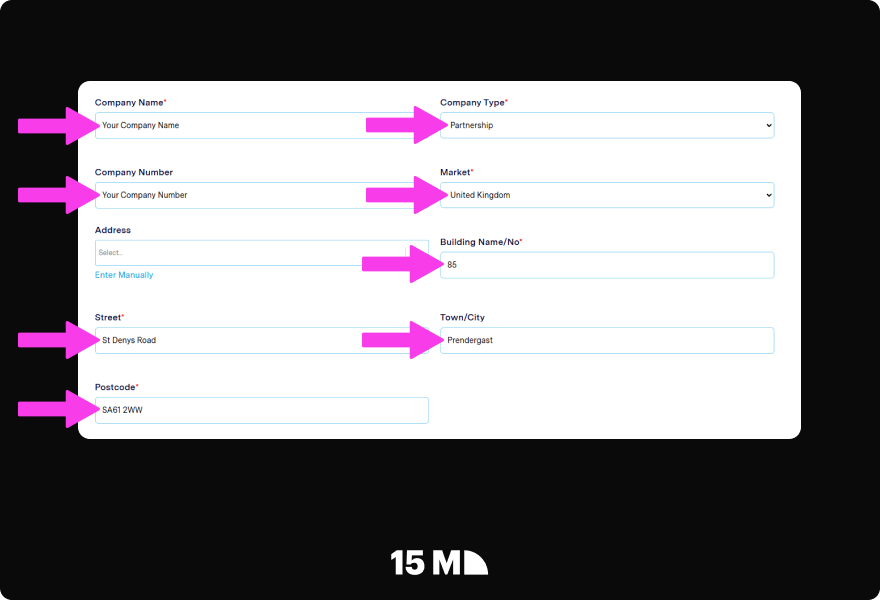
Step 1. Fill in your company information
Sign upGo to the registration form and choose your company type – pick from sole trader, limited company, partnership, or charity. Pick your market from the list of countries and enter your business address. Submit this part to continue.
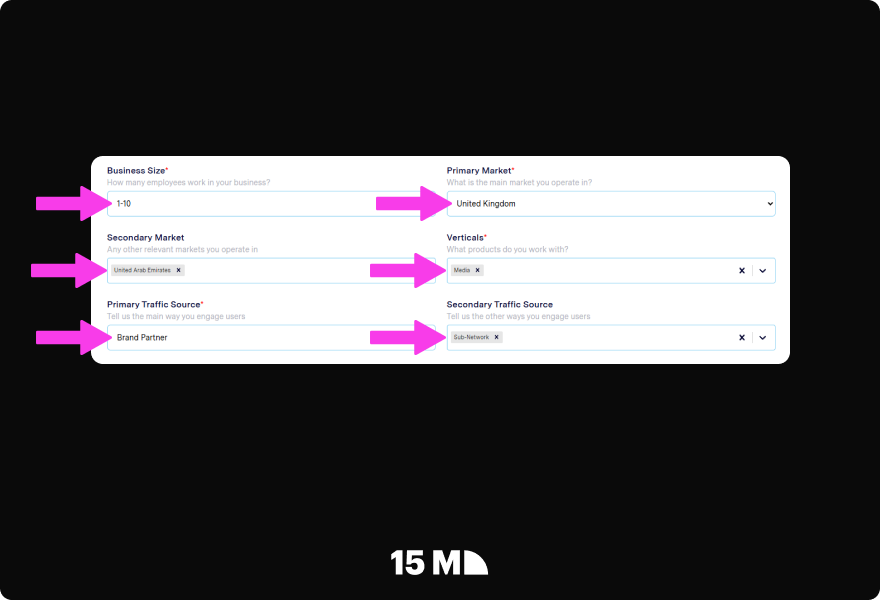
Step 2. Complete your profile
Specify how big your business is and identify the markets where you’re active. Choose the categories from the list and point out your traffic source. You can pick from cashback, comparison shopping, content sites, email, PPC, voucher codes, or sub-networks.
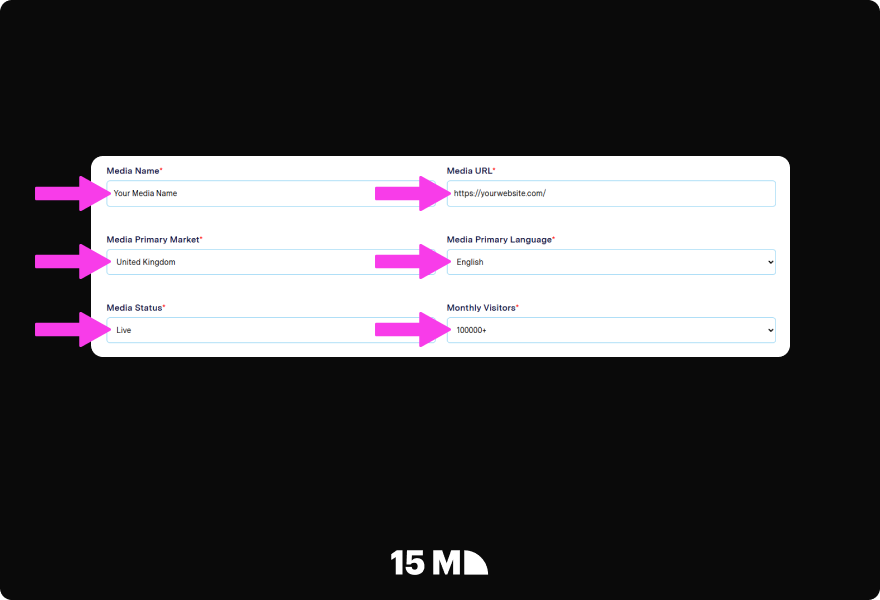
Step 3. Include and check media
Fill in your site or app URL, the market, language, how many visitors you get each month, and the development status.
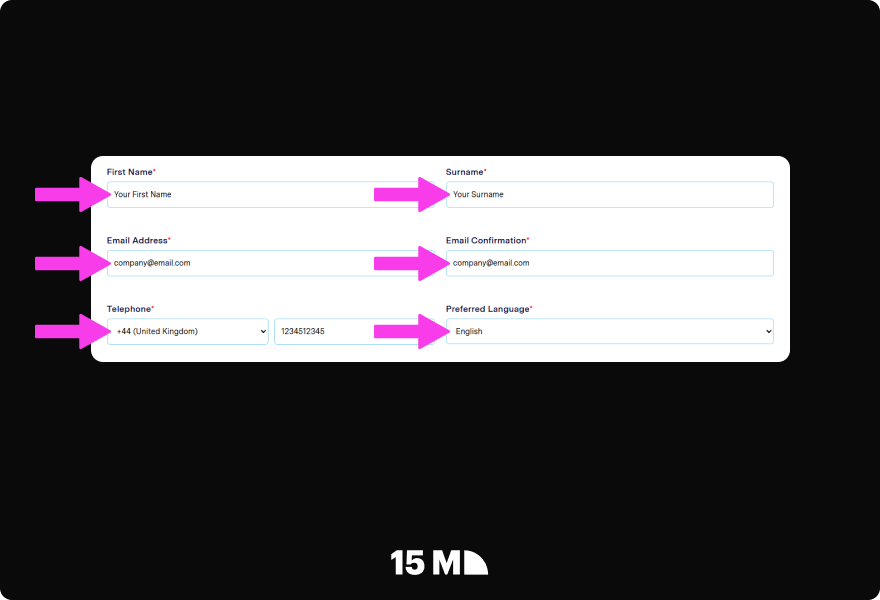
Step 4. Send over your contact details
Provide your first name, last name, email address, phone number, and the language you prefer. Check your email and click on the verification link sent to your inbox.
Step 5. Apply to Campaigns
Access the Campaigns Explorer to check out the programs that are available, click on Details for any campaigns that fit your audience, and hit Apply. Wait for email notifications about approval.
Step 6. Begin Attracting Traffic
Download product feeds to create content and grab vouchers using the app or browser extension. Launch your campaigns and keep an eye on conversions, clicks, and earnings via the reporting portal to see how well you’re doing.
Optimise Media Affiliate Network Vs Other Brands
Look at Optimise Media Affiliate Network alongside a few networks worldwide to see how these services vary in terms of commission structures, cookie policies, and features.
| Brand | Commission Rate | Cookie Duration | Unique Features |
|---|---|---|---|
| Optimise Media Affiliate Network | CPA, CPL, CPC, CPM, CPI, fixed-fee | Varies per campaign; not fixed globally | Presence in UK, Middle East, Africa, India, Southeast Asia, Australia, payments twice a month, tools for partner intelligence, reporting in real time |
| Lucky Star | Up to 60% RevShare or CPA up to $100 | Lifetime | 24/7 personal manager support, crypto payments, 0% admin fee |
| WinWin Partners | Up to 50% RevShare, CPA | 30 days | High commissions, fast and flexible payouts, global GEO coverage |
| 1Win Partners | Up to 50-60% RevShare, CPA up to $250 | 365 days | Quick weekly payouts, Global coverage, strong brand recognition |
Final Thoughts and Recommendations on Optimise Media Affiliate Network
Optimise Media Affiliate Network connects partners with over 800 advertisers, including Skoda, HSBC, Adidas, Samsung, and Trip.com in various parts of the world. The network works with CPA, CPM, CPC, CPL, and CPI commission setups. Tracking technology – Universal Tracking (Pixel) and Server to Server (S2S) – captures conversions on various devices. Partners get paid twice a month on the 7th and 21st, or the 14th and 28th if they’re in the SEA region. Linkables, browser add-ons, and product feeds make running your campaigns simpler.
This network is suited to affiliates, publishers, and sub-networks that handle a mix of traffic across niches and areas. Partners who look for public RevShare rates or serve the LatAm region may find that Optimise Media Affiliate Network does not quite match their needs.
FAQs
What areas does Optimise Media Affiliate Network focus on?

What commission models can you find at Optimise Media Affiliate Network?
How often does Optimise Media Affiliate Network pay affiliates?
Does it support sub-affiliate or sub-network traffic?
How long does it take to get a new affiliate approved?
What tracking options does Optimise Media Affiliate Network provide?
How can I get in touch with support at Optimise Media Affiliate Network?

Have you enjoyed the review?